What is Social Solitaire?
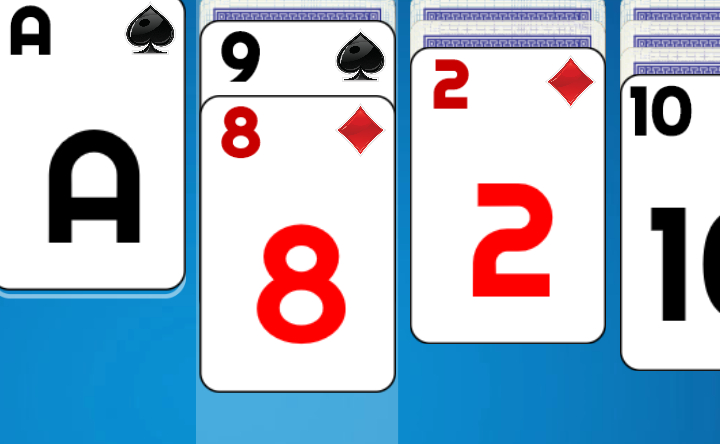
Social Solitaire is a web-based card title created by DrMop. The card game arrived in March 2020. The core loop centers on organizing shuffled cards across tableau columns and building complete foundation piles from aces up to kings. What makes the title distinctive is its choice between an open format with zero concealed cards and standard Klondike rules, paired with an in-game helper economy and extensive personal statistics. The game plays free in the browser with nothing to install.
Key features
- Dual rule systems: Choose between an open layout where all faces stay visible and classic Klondike rules with concealed card stacks.
- Crown progression: Earn crowns by clearing rounds or completing quest goals to unlock deck faces and table styles.
- Helpful rescue tools: Spend crowns to purchase move hints or retrieve cards back to the deck when the tableau gets congested.
- Reversible moves: Take advantage of a complimentary undo function to retract placements or test alternative card sequences.
- Performance analytics: Inspect your lifetime record with built-in statistics covering win percentages, clear times, and match history.
How to play
- Select your preferred rule format from the main screen to deal out the initial columns.
- Locate aces across the tableau and transfer them upward to start your foundation piles.
- Arrange descending sequences directly on the board by placing lower cards onto cards of the opposite color.
- Clear complete columns to make room for kings, opening new avenues for card repositioning.
- Draw reserve cards from the deck whenever visible columns present no viable moves.
- Spend crowns on hints or card retrieval when a complicated layout stalls your progress.
- Stack all cards into their respective suit foundations to finish the game.
Controls
| Action | Keyboard / mouse | Touch |
|---|---|---|
| Move card or sequence | Left-click and drag to target destination | Tap and drag across the screen |
| Request a move hint | Click hint icon (costs 1 crown) | Tap hint icon (costs 1 crown) |
| Retrieve a card | Click steal card icon (costs 2 crowns) | Tap steal card icon (costs 2 crowns) |
| Undo last move | Click undo button | Tap undo button |
| Access appearance settings | Click theme settings icon | Tap theme settings icon |
Crown economy and helpers
Players earn crowns by winning games and completing special quests during their play sessions. These crowns serve as an in-game currency that supports both cosmetic visual updates and practical recovery tools. When a deal becomes difficult, you can spend crowns to buy hints or pull an arbitrary card back into the deck to clear gridlock. Crowns can also be used to buy decorative card designs and table themes from the customization menu.
| Helper function | Crown price | Effect |
|---|---|---|
| Hint | 1 crown | Highlights a valid card move across the tableau |
| Steal a card | 2 crowns | Pulls a card back to the deck to relieve board congestion |
| Undo move | Zero crowns | Steps back to reverse previous placements at no cost |
Tips and strategy
- Uncover face-down cards promptly: In normal mode, prioritize moves that expose face-down cards because revealing hidden cards expands your options for future sequences.
- Save crowns for complex boards: Conserve your crowns for truly difficult situations because spending them too early leaves you without assistance when the deck gets tight.
- Keep open columns available for kings: Clear out tableau columns methodically because empty slots are the only locations where kings can be placed.
- Build foundation piles evenly: Avoid advancing a single suit too quickly into the foundation piles because cards placed up top cannot be used to sort tableau columns.
- Test sequences with undo: Use the undo button freely when exploring ambiguous branches because reversing your steps carries no penalty.
Game modes
Social Solitaire offers two distinct modes that adapt the experience to your mood and comfort level.
Relaxed mode
In relaxed mode, all cards on the tableau are dealt face up from the start with no hidden cards. This open setup eliminates guesswork, allowing you to survey the full board and calculate multi-step sequences before committing to your moves.
Normal mode
Normal mode presents the traditional Klondike solitaire format, where face-down cards sit beneath the surface. You must uncover each hidden card through methodical column sorting and careful suit management, providing a familiar and authentic tabletop challenge.
Similar games
If you enjoy card patience games, check out these related titles:
- Classic Solitaire delivers traditional patience gameplay with standard column ordering and suit foundations.
- Tri Peaks Solitaire offers fast board clearing centered around three climbing card peaks.
- Spider Solitaire 2 Suits provides multi-deck sorting across two suits for players seeking deeper strategic complexity.
In addition to the browser version, an Android edition of Social Solitaire was released for mobile play.
Developer and history
Social Solitaire was created by DrMop and released in March 2020. The game was designed to bring modern visual personalization, flexible difficulty modes, and comprehensive match history tracking to browser card enthusiasts.